GRID란?
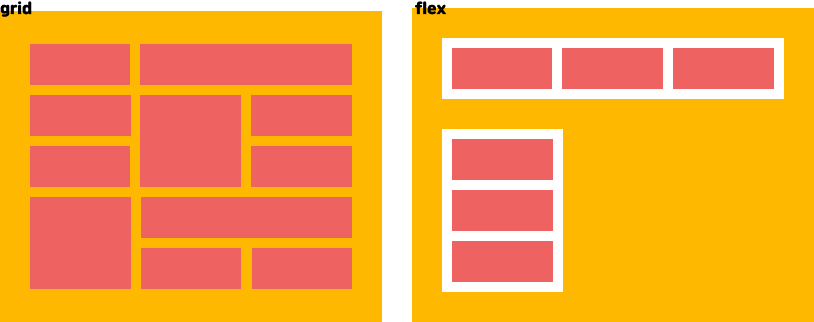
grid는 flex와 비슷한 듯 다르다. flex의 경우 가로 혹은 세로 한 가지 방향으로만 정렬 가능하지만, gird는 가로+세로로 정렬 가능하기 때문이다.
gird의 경우 IE에서는 따로 선언해줘야 하니 주의할 것! 특히, IE의 경우 grid를 선언하면 row, column 값을 전부 지정해줘야 한다.
그리드 용어 설명
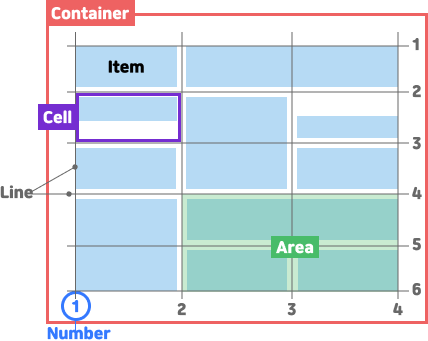
- 그리드 컨테이너(Grid container) : display:grid를 적용하는 전체 영역
- 그리드 아이템(Grid Item) : 컨테이너의 자식 요소
- 그리드 트랙(Grid track) : grid의 행 또는 열
- 그리드 셀(Grid cell) : 그리드 한 칸. 제일 작은 영역 단위. item이 들어가는 가상의 틀이다.
- 그리드 라인(Grid line) : 그리드의 트랙을 구분하는 선(1부터 시작하며, 트랙 사이의 간격을 의미한다.)
- 그리드 영역(Grid Area) : 그리드 라인으로 둘러싸인 사격형 영역으로 그리드 셀의 집합
- 그리드 번호(Grid Number) : 그리드 라인의 번호
- fr(fraction, 사용 공간에 대한 비율) : 그리드 트랙에 남아있는 여백의 크기를 fr앞의 숫자 비율대로 나눈다.
HTML 구조
<div class="container">
    <div class="item">item01</div>
    <div class="item">item02</div>
    <div class="item">item03</div>
    <div class="item">item04</div>
    <div class="item">item05</div>
    <div class="item">item06</div>
    <div class="item">item07</div>
    <div class="item">item08</div>
    <div class="item">item09</div>
</div>
display
.container{
    display: gird;
    /*IE*/
    display: -ms-grid;

    /*inline-block과 같이 컨테이너 자체를 block으로 할지 inline-block으로 할지*/
    display: inline-gird;
}
기본적으로 부모 요소에 flex 선언이 되어있어야 한다. 선언을 하면 자식들이 inline 되었음을 확인할 수 있다.
height 값은 컨테이너의 높이만큼 늘어난다. 이것이 float와의 차이점이다.
grid-template-rows(행) / grid-template-columns(열) - 그리드의 크기
repeat은 IE에서는 사용할 수 없다.
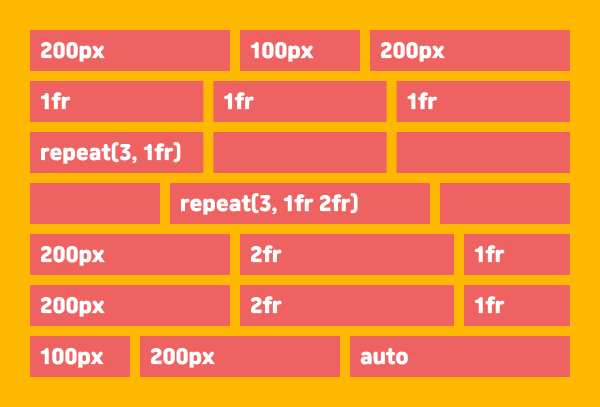
.container {
    /*200px:100px:200px*/
    grid-template-columns: 200px 100px 200px;

    /*1:1:1 비율 */
    grid-template-columns: 1fr 1fr 1fr;

    /*1의 비율을 3번 반복 즉 1fr 1fr 1fr과 동일 - IE에서 사용 불가*/
    grid-template-columns: repeat(3, 1fr);
    /*1의 비율과 2의 비율을 3번 반복*/
    grid-template-columns: repeat(3, 1fr 2fr);

    /*첫 열은 200px 둘째 열은 2비율만큼, 셋째 열은 1비율 만큼*/
    grid-template-columns: 200px 2fr 1fr;

    /*100px:200px:나머지*/
    grid-template-columns: 100px 200px auto;

    /*IE*/
    -ms-grid-columns: 1fr 1fr 1fr;
    -ms-grid-rows: 1fr 1fr 1fr;
}
repeat은 반복되는 값을 자동으로 처리할 수 있다. repeat(반복 횟수, 반복 값)
See the Pen GRID template by bo-ra-na (@bo-ra-na) on CodePen.
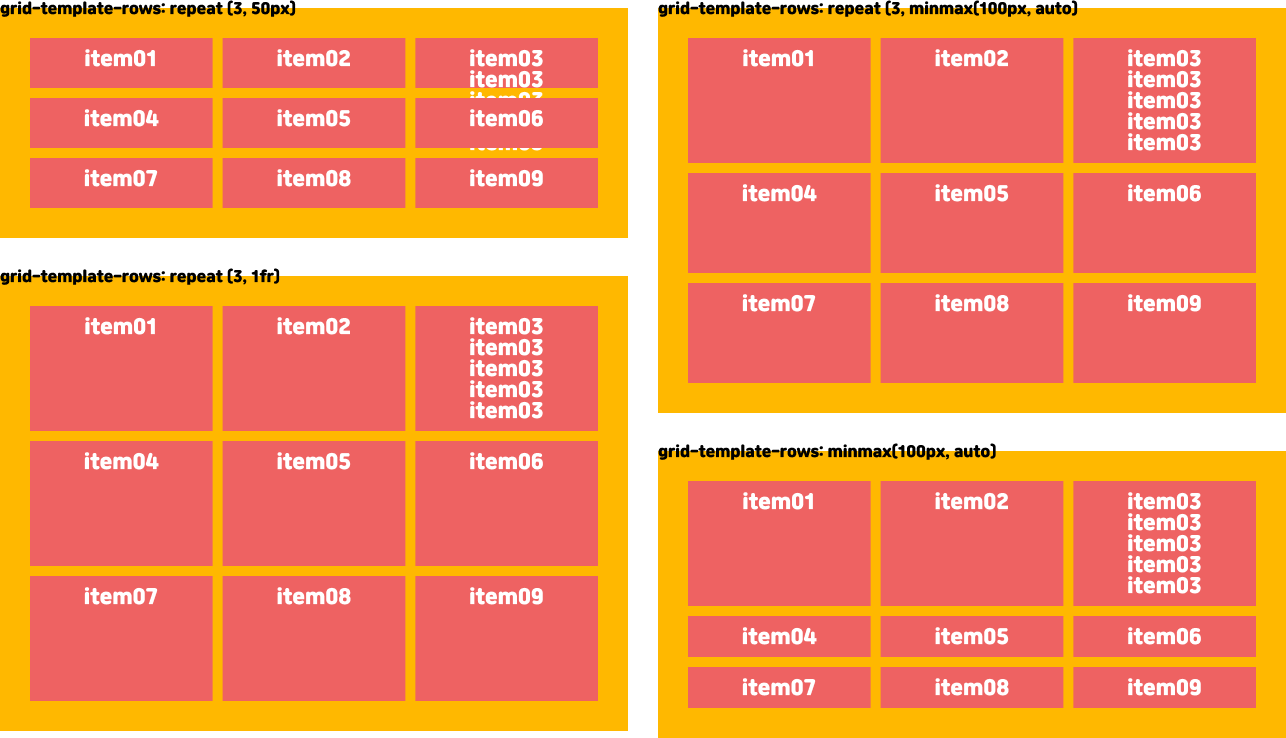
minmax - 최소, 최대 지정 함수
.container {
    /*열이 1의 비율로 3번 반복됨*/
    grid-template-columns: repeat(3, 1fr);

    /*행이 3번 반복되지만 최소 100px, 최대는 자동*/
    grid-template-rows: repeat(3, minmax(100px, auto));

    /*repeat을 사용하지 않으면 한줄만*/
    grid-template-rows: minmax(100px, auto);
}
auto-fill, auto-fit - 채우기
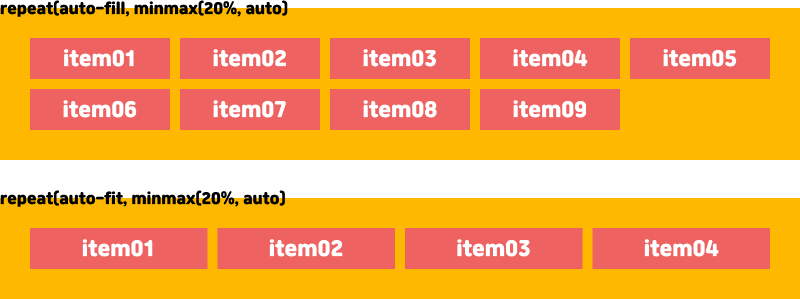
column, row의 개수를 정하지 않고 넓이가 허용되는 한 셀을 채운다. 상단 소스를 보면 repeat 시 몇 번 반복할지 적어야 하지만 auto-fill, auto-fit을 사용 시 숫자를 적을 필요가 없다.
.container {
    /*모든 컨텐츠를 최솟값 20%로 채우기*/
    grid-template-columns: repeat(auto-fill, minmax(20%, auto));

    /*남는 여백 없이 100%로 꽉채움*/
    grid-template-columns: repeat(auto-fit, minmax(20%, auto));
}
gap - 간격
IE에서는 사용할 수 없다.
.container {
    /*행(row) 간격 10px, 열(column) 간격 20px*/
    gap: 10px 20px;

    /* 세로의 간격을 10px로 */
    row-gap: 10px;

    /* 가로의 간격을 20px로 */
    column-gap: 20px;
}
grid-auto-rows / grid-auto-columns - 그리드 자동 정의
템플릿과 달리 그리드의 행 또는 열을 벗어난 트랙의 크기를 지정한다.
.container {
    /*행이 3번 반복되는 최소 100px, 100px이상은 자동*/
    grid-template-rows: repeat(3, minmax(100px, auto));
}
상단의 CSS의 경우 행이 3회 이상일 경우 지정된 값이 없게 된다. 따라서 row의 개수를 알 수 없다면 grid-auto를 써주면 된다.
.container {
    grid-auto-rows: minmax(100px, auto);
}
IE는 -ms-grid-rows / -ms-grid-columns 만 쓸 수 있다.
auto를 사용해주면 repeat 값이 필요 없어지게 된다.
See the Pen GRID by bo-ra-na (@bo-ra-na) on CodePen.
grid-row-start / grid-row-end / grid-row
grid-column-start / grid-column-end / grid-column - 셀 영역 지정
각 셀의 영역을 지정한다. 그리드의 경우 1부터 시작하는 라인 번호가 있다. 그 번호로 위치를 지정하는 것이다.
grid-row-start / grid-column-start가 시작번호, grid-row-end / grid-column-end가 끝번호이고, grid-row / grid-column은 start와 end를 한 번에 쓰는 축약형이다.
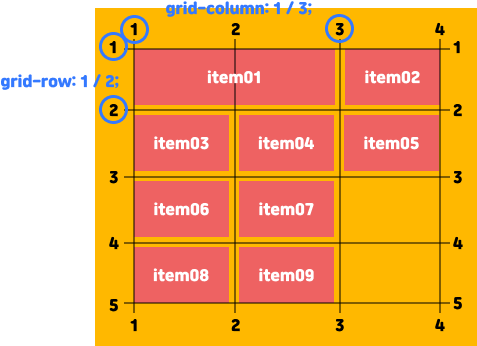
.item01{
    grid-row-start: 1;
    grid-row-end: 2;
    grid-column-start: 1;
    gird-column-end: 3;
    /*축약*/
    grid-row: 1 / 2;
    grid-column: 1 / 3;
    /*end를 생략하고 start만 적을 수 있다*/
    grid-column: 3;

    /*IE*/
    -ms-grid-row: 1;
    -ms-grid-row-column: 1;
}
시작과 끝을 지정하는 것 외에 cell을 얼마나 차지할 것인지도 지정 가능하다.
.item01{
    /*행 1번 셀에서 3번 셀까지*/
    grid-row: 1 / span 3;
    /*열 1번 셀에서 2번 셀까지*/
    grid-column: 1 / span 2;

    /*IE*/
    -ms-grid-row-span: 1;
    -ms-grid-column-span: 2;
}
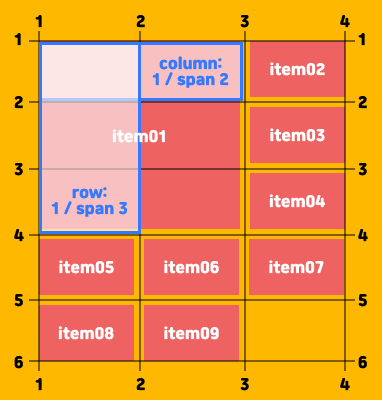
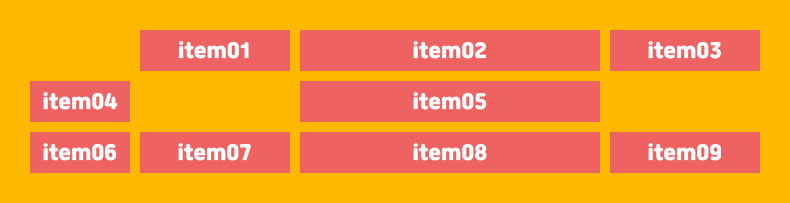
또한, grid-column은 상단의 grid-auto-columns처럼 grid-template-columns의 통제를 받지 않는 column을 만 들 수 있다.
.container {
    grid-template-columns: 100px;
    grid-auto-columns: 1fr 2fr;
}
.cell .ver3 .item:nth-child(1) {
    grid-column: 2;
}
.cell .ver3 .item:nth-child(2) {
    grid-column: 3;
}
.cell .ver3 .item:nth-child(3) {
    grid-column: 4;
}
.cell .ver3 .item:nth-child(5) {
    grid-column: 3;
}
.cell .ver3 .item:nth-child(6) {
    grid-column: 1;
}
첫 번째 column만 grid-template-columns의 통제를 받아 50px이 되고, 나머지는 grid-auto-columns의 영향을 받아 1fr 2fr의 비율을 반복하게 된다.
grid-template-columns과 grid-auto-columns는 grid-column을 추가해야 사용 가능하다.
grid-template-areas - 영역 이름 지정
grid-area - 아이템 이름 지정
각 영역에 이름을 붙여서, 이름을 이용해 배치.
IE에서는 사용할 수 없다.

상단 이미지를 만들기 위한 CSS는 아래와 같다.
각자 차지하는 셀 개수만큼 해당 위치에 이름을 써준다. 셀의 구분은 공백으로 한다.
빈칸은 마침표 혹은 none을 사용하면 된다.
.container {
    grid-template-areas:
        "a a a"
        "b c c"
        "b c c"
        ". . ."
        "d d d";
}
그 이후 각 영역의 이름을 item 요소에 grid-area 속성으로 지정해주게 된다.
HTML 구조
<div class="container">
    <div class="header">a</div>
    <div class="left">b</div>
    <div class="right">c</div>
    <div class="bottom">d</div>
</div>
CSS 구조
.header { grid-area: a; }
.left { grid-area: b; }
.right { grid-area: c; }
.bottom{ grid-area: d ; }
grid-auto-flow - 자동 배치
아이템이 자동 배치되는 흐름 결정
IE에서는 사용할 수 없다.
.container {
    grid-template-columns: repeat(auto-fill, minmax(25%, auto));
    grid-template-rows: repeat(5, minmax(50px,auto));
}

.item:nth-child(1){
    grid-column-start: 1;
}
.item:nth-child(2){
    grid-column: auto / span 3;
}
.item:nth-child(5){
    grid-column: auto / span 3;
}
.item:nth-child(7){
    grid-column: auto / span 2;
}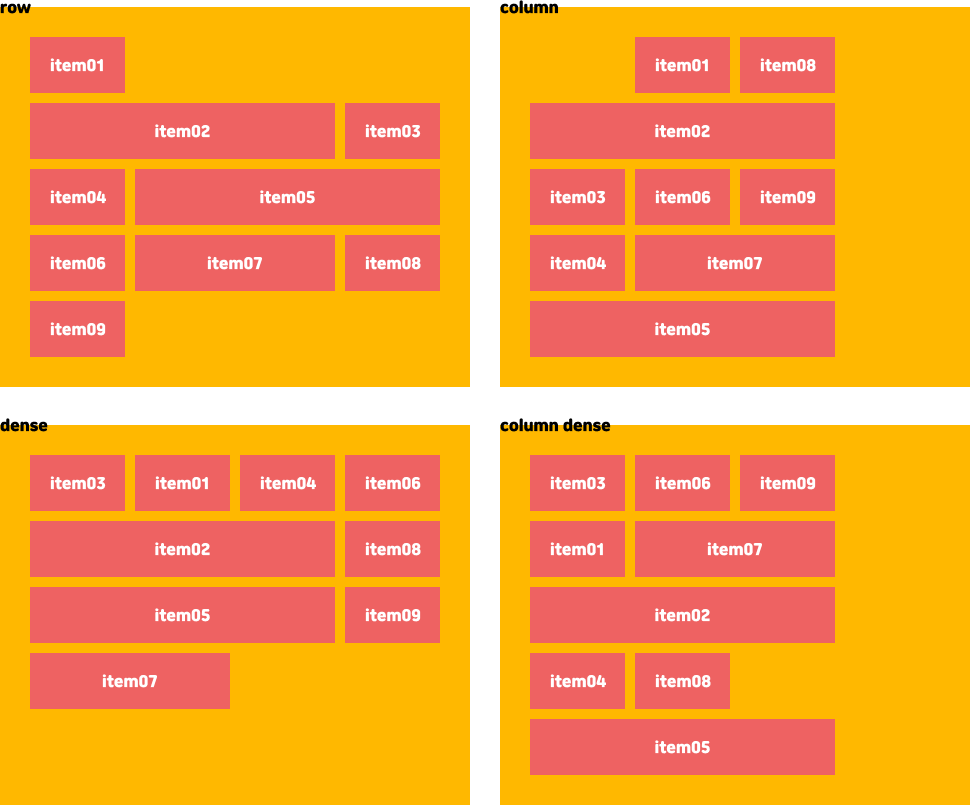
item02, item05, item07의 셀 차지 비율을 늘렸더니 뒤죽박죽이 된다.
기본 배치는 item이 행 순서대로 배치되다 더 이상 들어갈 영역이 없으면 셀을 비우고 아래로 배치된다.
.container {
    /*기본값*/
    grid-auto-flow: row;

    /*열을 차례로 채운다.*/
    grid-auto-flow: column;

    /*빈 칸을 모두 채운다. item의 순서가 맞지 않을 수 있다.*/
    grid-auto-flow: dense;

    /*dense와 동일*/
    grid-auto-flow: row dense;

    /*열로 정렬하면서 빈칸을 모두 채운다*/
    grid-auto-flow: column dense;
}
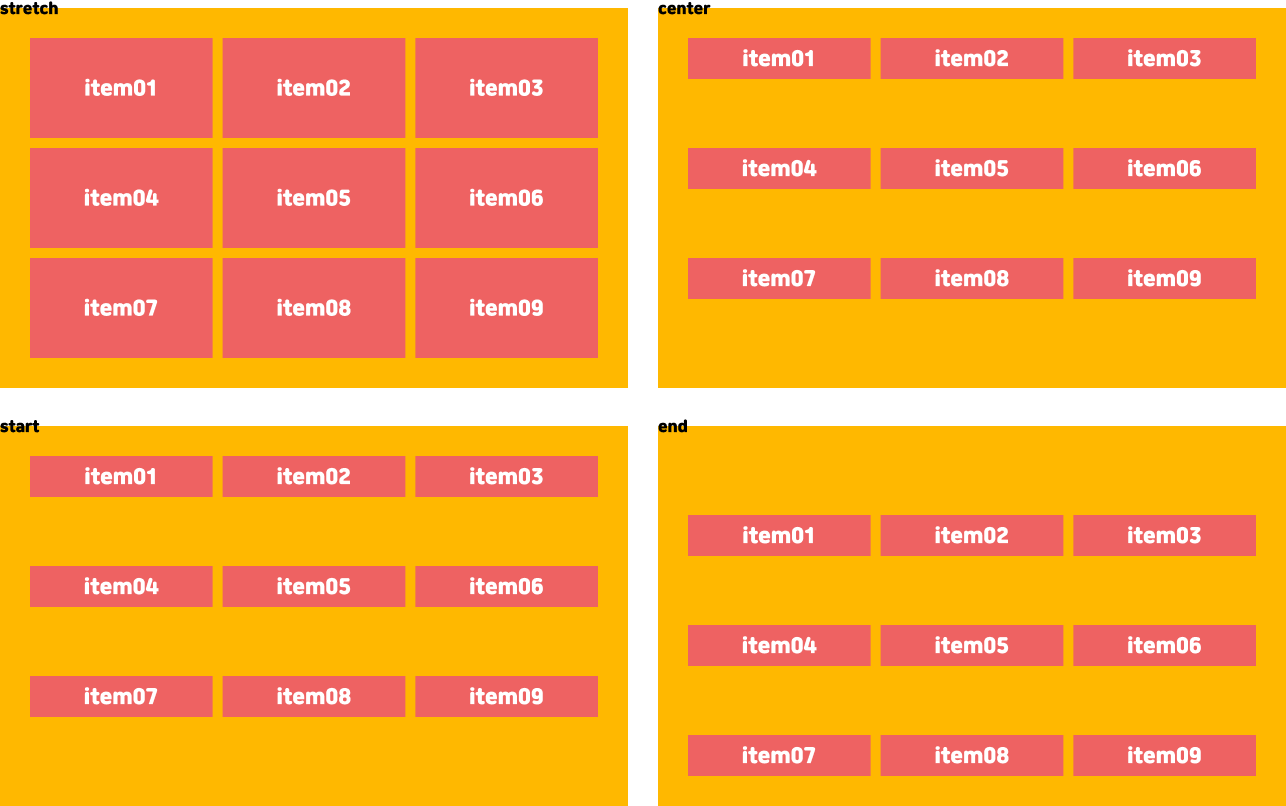
align-items - 수직 정렬
IE에서는 사용할 수 없다.
셀 안에서 아이템 정렬
.container{
    /*기본값 - 늘어남*/
    align-items: stretch;

    /*가운데*/
    align-items: center;

    /*시작*/
    align-items: start;

    /*끝*/
    align-items: end;
}
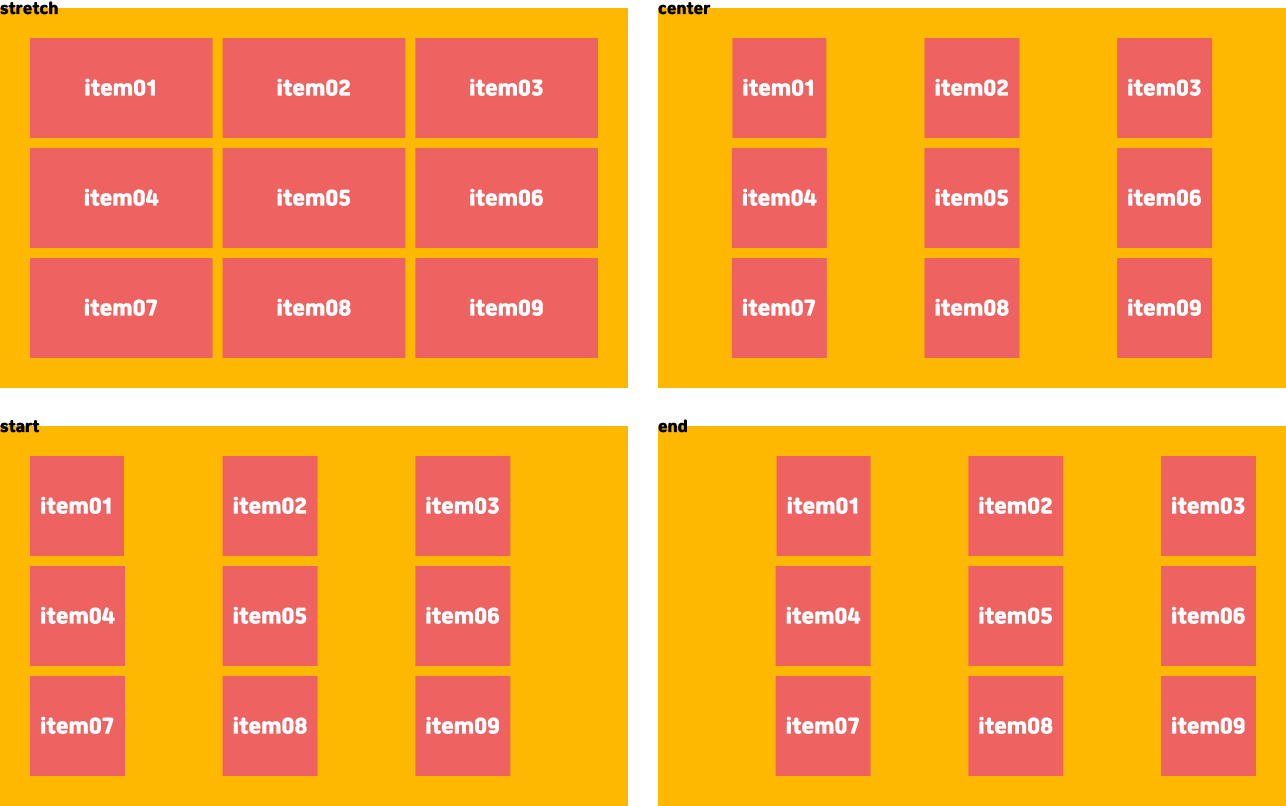
justify-items - 수평 정렬
IE에서는 사용할 수 없다.
셀 안에서 아이템 정렬
.container {
    /*기본값 - 늘어남*/
    justify-items: stretch;

    /*가운데*/
    justify-items: center;

    /*시작*/
    justify-items: start;

    /*끝*/
    justify-items: end;
}
place-items - 수직+수평 정렬
IE에서는 사용할 수 없다.
align-items와 justify-items를 같이 쓰는 축약어다. align - justify 순으로 쓰고 하나만 쓰면 두 속성 공통이다.
.container {
    place-items: center stretch;

    /*
    	place-items: center;
    	stretch
    	center
        start
        end
    */
}
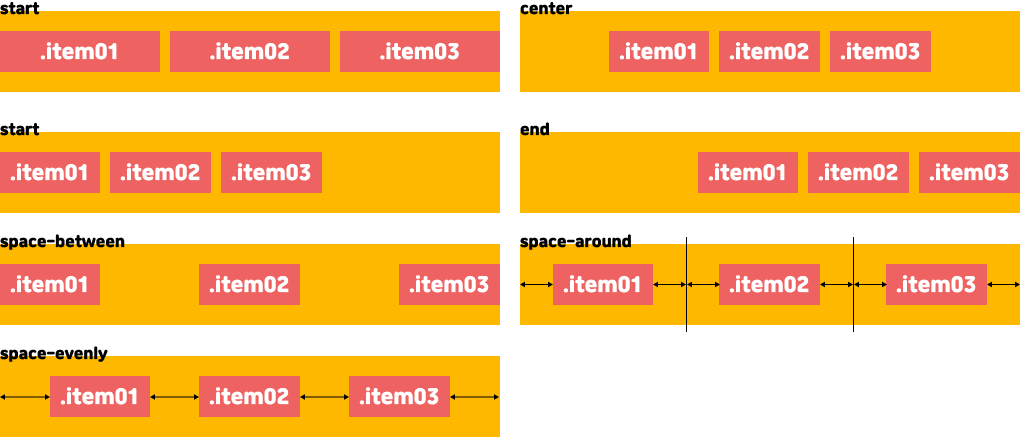
align-content - 수직 그룹 정렬
IE에서는 사용할 수 없다.
상단의 items와 다르게 셀 안에서 아이템이 정렬되는 것이 아닌 컨테이너 안에서 정렬된다.
.container {
    /*기본값 - 늘어남*/
    align-content: stretch;

    /*가운데*/
    align-content: center;

    /*시작*/
    align-content: start;

    /*끝*/
    align-content: end;

    /*아이템 사이의 균일한 간격*/
    align-content: space-between;

    /*아이템 둘레의 균일한 간격*/
    align-content: space-around;

    /*아이템 양끝의 균일한 간격*/
    align-content: space-evenly;
}
justify-content - 수평 그룹 정렬
IE에서는 사용할 수 없다.
상단의 items와 다르게 셀 안에서 아이템이 정렬되는 것이 아닌 컨테이너 안에서 정렬된다.
.container {
    /*기본값 - 늘어남*/
    justify-content: stretch;

    /*가운데*/
    justify-content: center;

    /*시작*/
    justify-content: start;

    /*끝*/
    justify-content: end;

    /*아이템 사이의 균일한 간격*/
    justify-content: space-between;

    /*아이템 둘레의 균일한 간격*/
    justify-content: space-around;

    /*아이템 양끝의 균일한 간격*/
    justify-content: space-evenly;
}
place-content - 수직+수평 그룹 정렬
IE에서는 사용할 수 없다.
align-content와 justify-content를 같이 쓰는 축약어다. align - justify 순으로 쓰고 하나만 쓰면 두 속성 공통이다.
.container {
    place-content: center stretch;

    /*
    	place-content: center;
    	stretch
    	center
    	start
    	end
    	space-between
    	space-around
    	space-evenly
    */
}
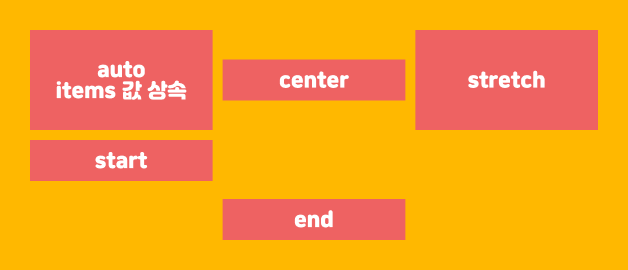
align-self - 수직 정렬
셀 안에서 해당 아이템을 수직방향으로 정렬합니다.
.item {
    /*기본값 - align-items 상속*/
    align-self: auto;

    /* 가운데 */
    align-self: center;

    /* 늘어남 */
    align-self: stretch;

    /*시작점*/
    align-self: start;

    /*끝점*/
    align-self: end;

    /*IE*/
    -ms-grid-row-align : auto;
}
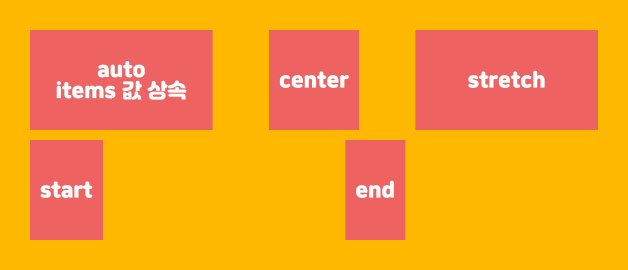
justify-self - 수평 정렬
셀 안에서 해당 아이템을 수직방향으로 정렬합니다.
.item {
    /*기본값 - justify-items 상속*/
    justify-self: auto;

    /* 가운데 */
    justify-self: center;

    /* 늘어남 */
    justify-self: stretch;

    /*시작점*/
    justify-self: start;

    /*끝점*/
    justify-self: end;

    /*IE*/
    -ms-grid-column-align: auto;
}
place-self - 수직+수평 그룹 정렬
IE에서는 사용할 수 없다.
align-self와 justify-self를 같이 쓰는 축약어다. align - justify 순으로 쓰고 하나만 쓰면 두 속성 공통이다.
.item {
    place-self: center stretch;

    /*
    	place-self: center;
        auto
    	stretch
    	center
        start
        end
    */
}
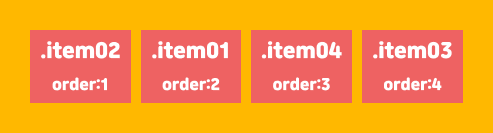
order - 배치 순서
item들의 시각적 순서이다. 물리적인 위치 값은 변경되지 않는다. 즉, 스크린리더에서는 효과가 없음.
-값도 가능하다.
IE는 -ms-grid-column / -ms-grid-row로 각각 값을 정해줘야 하기 때문에 order로 값을 줘도 의미가 없다.
.item:nth-child(1){order: 2}
.item:nth-child(2){order: 1;}
.item:nth-child(3){order: 4;}
.item:nth-child(4){order: 3;}